If your webpages currently look cluttered or confusing, there’s a good chance your visual hierarchy needs work.
Whether you’re running an e-commerce site or building out a professional services homepage, you want every element from your logo to your “Buy Now” button to feel like it’s in the right place.
That’s where visual hierarchy comes in. It determines how your design elements are arranged and how they compete (or cooperate) for attention. The correct use of visual hierarchy makes your website feel seamless and user-friendly, all while improving conversions.
In this article, our Salt Lake City web design firm professionals will explain how you can use the principles of visual hierarchy to create web pages that not only look great but perform even better.
Why Visual Hierarchy Matters
Visual hierarchy defines the path users take to find what they’re looking for on your site. Visitors landing on your page might be looking for a specific product or want to contact your business. With a clear visual hierarchy, they can easily find the information they need.
The opposite happens when your visual hierarchy is weak. Visitors have to jump through hoops to find what they’re looking for. The result is a poor customer experience that can reflect negatively on your reputation.
Good visual hierarchy creates a natural reading flow. Your headline catches attention first, then supporting details fill in the gaps, and finally your call-to-action tells people what to do next. This simple structure makes your site easier to scan and gets more visitors to do what you want them to do.
Key Principles of Visual Hierarchy
1. Size and Scale
You naturally look at the biggest thing on a page first. That’s why headlines are larger than regular text, and buttons are usually big and colorful. You can use size to bring attention to the elements you want people to see.
Change up your text and image sizes to draw attention to key information. This gives visitors a natural rhythm to follow as they scroll through your site.
2. Color and Contrast
Apart from aesthetics, color helps guide where people look on your page. Bright colors naturally grab attention, especially when they’re surrounded by neutral tones. High contrast between text and background also makes things easier to read.
To get the best results, use color with intention. Save your brightest colors for buttons and calls-to-action that need clicks. If your brand palette is mostly muted, add a pop of bright color where you want people to look.
3. Typography and Font Weight
The fonts you choose affect how people read your content. Headers should be larger and bolder than body text to create a clear separation. You can even use a different font for headers if it fits your brand.
Small details like uppercase letters for headings, line spacing, and bold versus regular text all help build hierarchy. When you use these consistently, visitors will naturally follow the reading pattern you’ve created without even thinking about it.
4. Spacing and White Space
Don’t be afraid of empty space. This is the breathing room between your design elements, and it keeps layouts clean and easy to read. Cramming everything together makes your site confusing and harder to use.
White space helps separate different sections, highlights important elements, and makes your design look intentional instead of messy. It’s often what separates a chaotic website from one that feels polished and easy to navigate.
5. Alignment and Layout
Everything from top to bottom needs to be aligned. Proper alignment makes your site look organized and professional while building trust with visitors.
Keep your spacing consistent and line things up properly. Use a grid to organize your content so everything has its place. When your layout is predictable, visitors can find what they need without getting confused.
How to Evaluate Your Current Visual Hierarchy
If you’re not sure how well your site is applying these principles, take a step back and review your pages with a critical eye. Ask yourself:
- What stands out immediately?
- Is it the most important thing you want users to notice?
- Is there a clear progression from headline to supporting copy to call-to-action?
Try squinting at your page or viewing it in grayscale. What pops out? If your CTA blends into the background or your most important message gets lost, it’s time to make some layout adjustments.
Common Mistakes That Disrupt Visual Hierarchy
Many websites unintentionally disrupt their own hierarchy by overloading the page with competing elements. Using too many fonts, choosing colors that clash, or placing too many CTAs above the fold can dilute your message. Avoid these pitfalls by sticking to a hierarchy system and maintaining consistency across pages.
Another frequent mistake is using carousels or animations that shift attention randomly. While they may seem engaging, they often distract from the primary goal of the page. If you want to maintain good hierarchy, every visual should reinforce rather than fight against your intended flow.
How a Good Web Design Firm Helps You Get It Right
The best design firms don’t treat visual hierarchy as an afterthought. Rather, they prioritize it from the very beginning. They build your site to guide visitors from the moment they land toward the action you want them to take.
Whether you’re launching a new site or reworking an old one, a good designer will structure every page to align with your business goals and user needs. That includes creating a flexible layout that your internal team can manage post-launch without sacrificing design integrity.
By prioritizing clean layouts and quick load times, designers should make sure your site feels both familiar and professional to your audience. As you look for potential design firms, ask them how they will support your site’s visual hierarchy.
Use Visual Hierarchy to Your Advantage
If you want visitors to take action on your website, make sure the design guides them there. When you build a site with a clear visual hierarchy, people can find what they need and know exactly what to do next.
Remember that every element on your page either helps or hurts your conversion rate. Focus on the basics: size, color, spacing, and typography. These choices control how visitors move through your site and whether they take action.
If you’re looking for a Utah web design agency to elevate your site’s visual hierarchy, give us a call today. We can structure your site around your business goals and create a layout that’s easy for your team to update down the road.
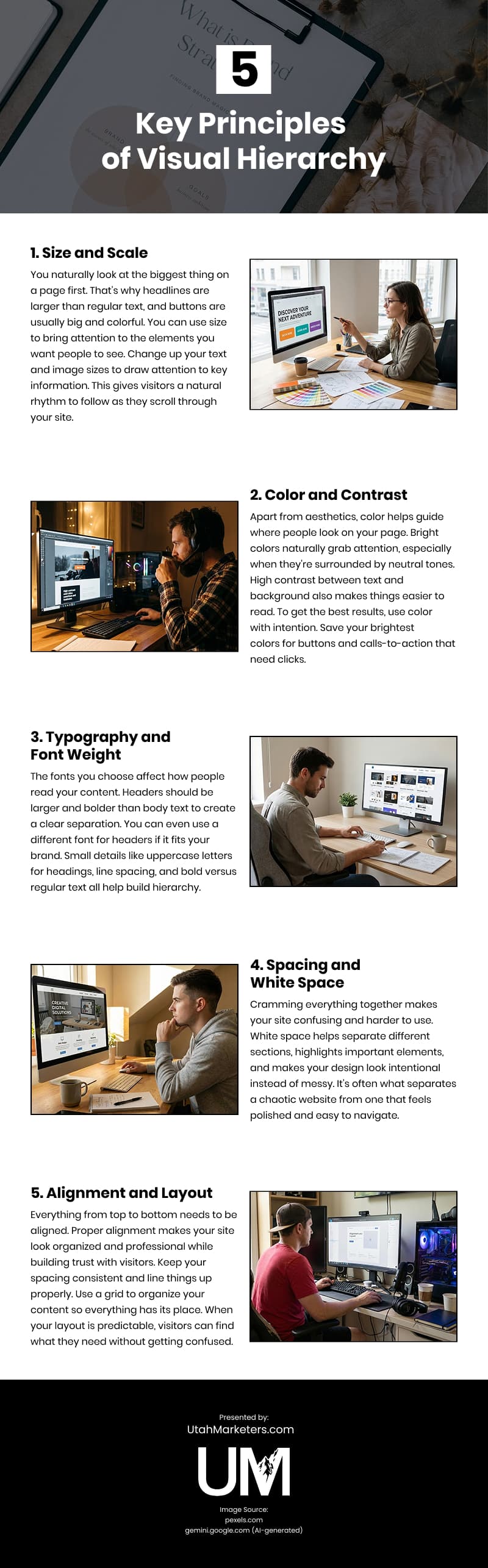
Infographic
Visual hierarchy is essential to a user’s website experience, guiding attention and improving comprehension. When design elements compete for focus, pages quickly become cluttered. This infographic outlines the core principles of visual hierarchy and how to apply them effectively.