Is your web form asking visitors to work through a long list of steps? Then you are likely losing potential customers at the very last step of the journey.
Web forms should be simple and quick to complete. But many businesses end up with forms that are too long, hard to use on mobile, or so confusing that they make someone give up and call a competitor.
Don’t be that business. By keeping your form focused and easy to fill out, you only make it easier for people to reach you.
Whether you run a contracting business, a dental practice, or any other local service, here are some tips from our Orem web design agency for improving your web form and turning more visitors into leads.
Start with a Single Outcome and Build Around It
A web form converts when it is tied to one clear purpose. This can be as simple as letting someone contact your business, but it is often helpful to get more specific.
For example, you can build a quote request form if that is the action you want people to take. Likewise, you can set up a scheduling form if you want people to book a call directly. People move faster when they know exactly what they are doing and what happens next.
Make that purpose clear from the first field. Having a short headline and one sentence of context can go a long way. Some people worry that they need a long explanation, but that is all you need to point someone in the right direction.
Field Count Matters More Than Most People Admit
Extra form fields often result in people giving up before they hit submit. It is not necessary to collect everything up front. You can ask for the basics first and then gather more details during follow-up. Collect the minimum you need to respond well.
A good starting point for most lead forms is name, email or phone, and one open field for context. If you want to qualify leads further, make sure each additional field ties to a real next step. Dropdowns and radio buttons can feel easier than open text fields, but they create friction if the choices do not match real situations.
If you are tempted to add fields for budget or timeline, ask yourself whether the answer will change how you respond. If it will not, remove it.
Labels, Placeholders, and Microcopy Carry More Weight Than Design Trends
Your form can look great and still fail to convert. That usually happens when you fail to make it clear what you are asking for. If you are using placeholder text inside fields, make sure labels are also visible outside the field. Because placeholders disappear once a user starts typing, the user will be forced to depend on their memory. This is especially problematic on mobile where people have to stop and re-read to remember what a field was asking.
The best way to reduce hesitation is through microcopy. Using a short line under a phone field like “Text is okay” can help increase submissions. A note under an email field like “We will send your confirmation here” can also be a small but effective way to reassure people. Keep it calm and specific so it feels helpful rather than pushy.
You can also use error messages to guide people rather than frustrate them. “Please enter a phone number with 10 digits” solves the problem immediately, while a vague message like “Invalid input” just wastes time.
Avoid Using Placeholder Text as a Label: Placeholder text disappears once the user starts typing, forcing them to rely on memory. This is a … Clearly Mark Optional Fields: If you must include non-essential fields, label them clearly as “(optional)”. This gives users a sense of
Design the Form for Mobile First
Most users touch your form on a phone at some point. They might start researching on desktop and complete the form later on mobile. If your form fields are cramped or your button sits too close to other elements, you will lose people who intended to convert.
Mobile-friendly form design includes generous spacing and input types that match the field. Phone fields should trigger the number keypad. Email fields should use the email keyboard. Address fields should support autocomplete when possible. These are small details that help users finish faster.
Check your form on a phone while on cellular data. That is a realistic situation for a homeowner requesting a quote or a customer looking for quick service. If the form feels slow or hard to use there, it will feel worse everywhere else.
If you are struggling with this, a custom web design agency can help you design forms in a way that keeps mobile users engaged and makes it easier for them to reach you.
Structure Longer Forms So They Feel Lighter
Long forms can still convert if you structure them well. Multi-step forms often perform better than a single long page because each step feels manageable rather than overwhelming. If you use this approach, show progress clearly so users know how many steps remain.
Preselecting common options can also speed things up. For example, if most of your customers prefer to be contacted by phone, making that the default saves them a decision. Just avoid selections that feel like they were made for your convenience rather than theirs.
Here are a few small decisions that can make a form feel easier to complete:
- Use a two-step layout when you need more than six fields, so users are not hit with a wall of inputs
- Put the easiest fields first so users build momentum before reaching anything more complex
- Save optional fields for the end and label them clearly as optional
Test What You Can Measure and Keep It Honest
One of the best ways to improve your form is to track how visitors move through it. You will want to see where people are dropping off, how long each step takes, and whether behavior differs by device. Here are some metrics worth watching:
- Completion rate
- Field drop-off points
- Time to complete
- Device breakdown
If you do not have this data yet, start with basic analytics and a simple form tracking setup.
Once you have something to work with, changes should be incremental and intentional. Adjust one variable at a time and measure before touching anything else. If you change button text, field count, and layout all at once, you will have no way of knowing what made the difference.
The submissions you already receive can also point you in the right direction. If users keep asking the same question in an open field, add a short line on the page that answers it. If people keep leaving a field blank, rethink whether it belongs there at all.
Where Form Design Is Going Next
The way people see and use forms will keep evolving as new devices and user expectations emerge. You will get better autofill support and cleaner mobile inputs as standard. That means the bar for what feels acceptable will keep rising.
So if you want your form to keep converting, make sure it keeps up with how people expect to interact online. The details that feel optional today will feel mandatory tomorrow.
If your current form setup is falling behind, you may need to take a step back and rethink the design. Going with something built around your audience can help you get it right from the start. An agency that specializes in custom web design can help you identify what is costing you leads and make targeted changes to create a form that converts consistently.
Video

Infographic
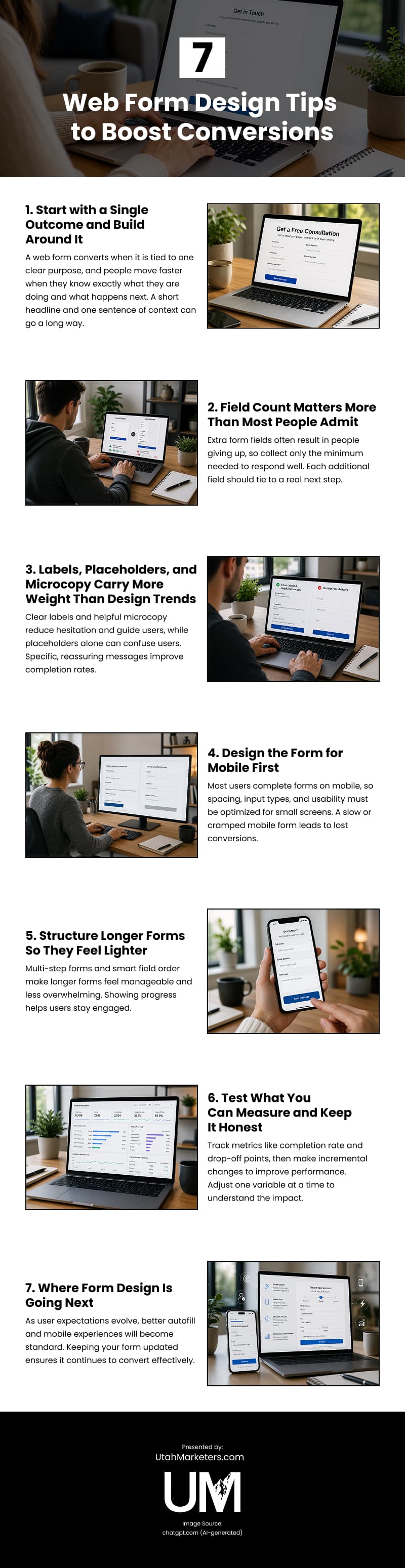
Well‑designed web forms are essential for turning website visitors into leads, yet many businesses unintentionally create forms that feel overwhelming, confusing, or frustrating to complete. This infographic shares practical web‑form design tips to help boost conversions.